> For the complete documentation index, see [llms.txt](https://gamelauncher.cloud/help/llms.txt). Markdown versions of documentation pages are available by appending `.md` to page URLs; this page is available as [Markdown](https://gamelauncher.cloud/help/extensions/unreal-engine-extension.md).
# Unreal Engine Extension
The **Game Launcher Cloud Unreal Engine Extension** allows you to build and upload your Unreal Engine game builds directly from the Unreal Editor to Game Launcher Cloud.
## Features
* **Build & Upload**: Build your game and upload to Game Launcher Cloud in one click
* **API Key Authentication**: Securely authenticate using your API keys
* **Real-time Progress**: Track compression and upload progress in real-time
* **Build Status Monitoring**: Monitor backend build processing status
* **Multipart Uploads**: Optimized uploads for large files with automatic multipart handling
* **CLI Recommendation**: Smart warnings for builds larger than 5GB
## Installation
### Method 1: Install from Fab (Recommended)
1. Visit the [Game Launcher Cloud plugin page on Fab](https://www.fab.com/listings/af88972c-9d69-42cd-bcaa-109bb8dd31c6)
2. Click **Add to Cart** or **Free Download** (if applicable)
3. Open the **Epic Games Launcher**
4. Go to **Unreal Engine > Library > Vault**
5. Find "Game Launcher Cloud" and click **Install to Engine**
6. Select your Unreal Engine version (5.4 or later)
7. Open your project in Unreal Engine
8. Go to **Edit > Plugins**
9. Search for "Game Launcher Cloud"
10. Enable the plugin
11. Restart the editor when prompted
### Method 2: Install from GitHub (Manual)
1. Download the latest release from [GitHub Releases](https://github.com/GameLauncherCloud/GameLauncherCloud-UnrealEngineExtension/releases)
2. Extract the plugin to your project's `Plugins` folder:
```
YourProject/Plugins/GameLauncherCloud/
```
3. Restart Unreal Engine
4. Open your project
5. Go to **Edit > Plugins**
6. Search for "Game Launcher Cloud"
7. Enable the plugin
8. Restart the editor when prompted
## Quick Start
### Step 1: Get Your API Key
1. Visit [Game Launcher Cloud API Keys](https://app.gamelauncher.cloud/user/api-keys)
2. Click **Create New API Key**
3. Give it a name (e.g., "Unreal Engine Plugin")
4. Copy your API key (keep it secure!)
### Step 2: Open the Manager
1. In Unreal Engine, go to **Tools** menu
2. Click **Game Launcher Cloud**
3. The manager window will open
### Step 3: Login
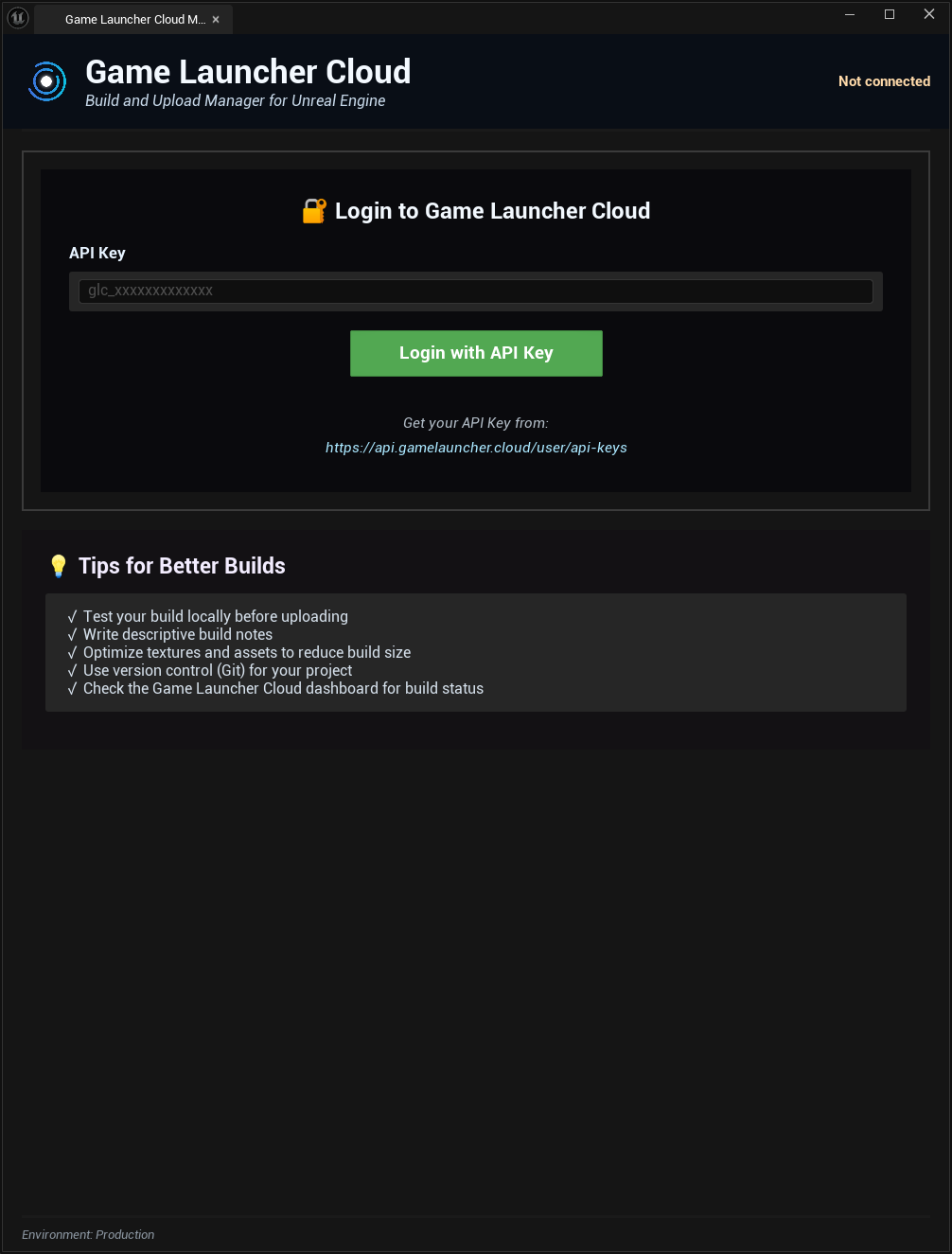
1. In the **Login** tab, paste your API Key
2. Click **Login with API Key**
3. You should see a success message with your email
### Step 4: Build and Upload
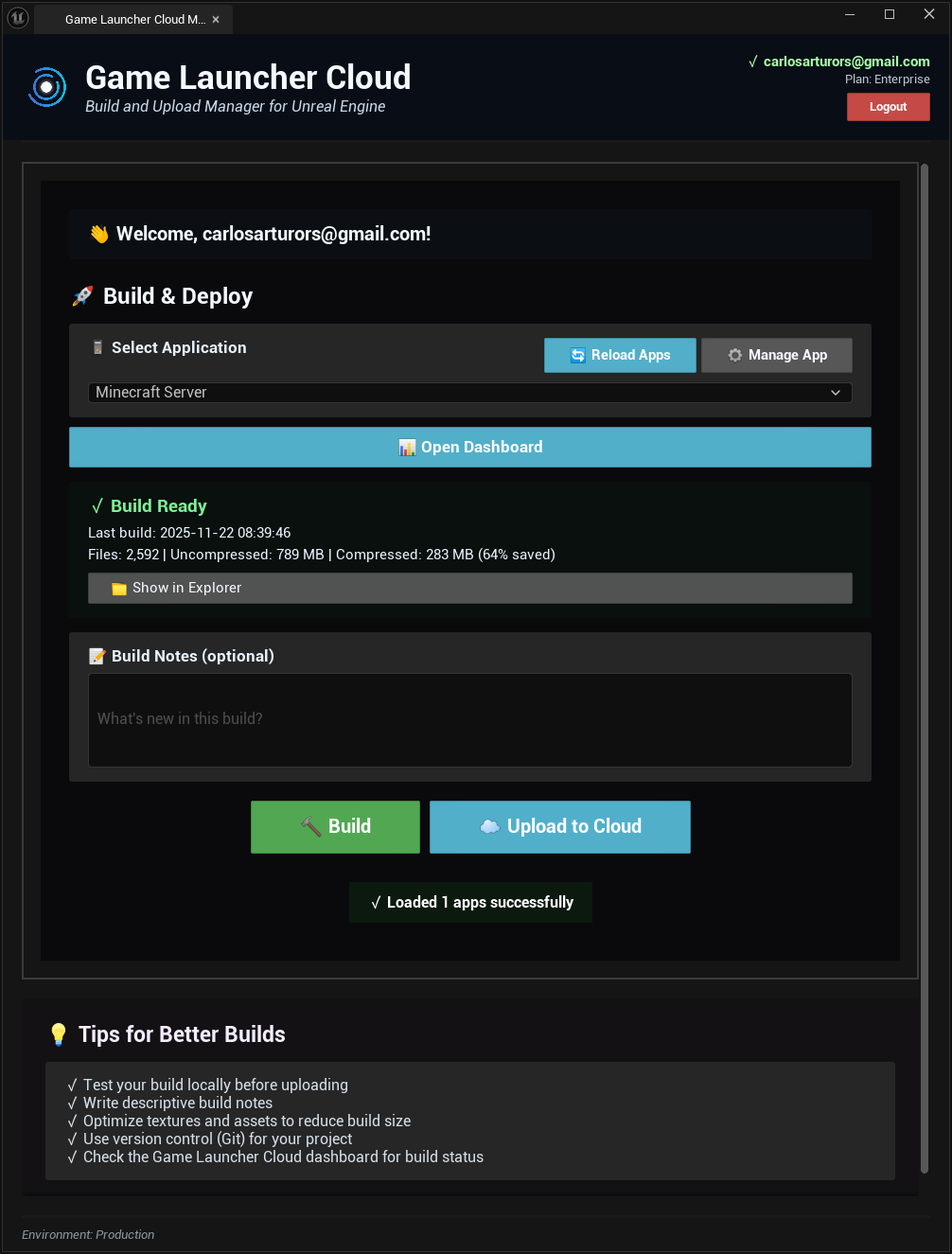
**Select Application**
* Click **Reload Apps** to load your available apps
* Select the app you want to upload builds to from the dropdown
* Optionally click **Manage App** to open it in the dashboard
**Build Notes**
* Add version info, changelog, or important notes for your build
**Build Actions**
* **Build**: Package your game without uploading (creates a compressed build)
* **Upload to Cloud**: Upload an existing compressed build
* **Build & Upload**: Package and upload in one step
**Build Detection**
* The plugin automatically detects existing builds in your project
* Shows build date, file count, and compression info
**Progress Tracking**
* Real-time compression progress (file-by-file)
* Upload progress with speed and ETA
* Backend processing status with detailed stages
## Requirements
* Unreal Engine 5.4 or later (compatible with UE 5.0+)
* Visual Studio 2019 or newer (for building from source)
* Active Game Launcher Cloud account
* API Key with upload permissions
* Windows 64-bit (macOS support coming soon)
## Supported Platforms
### Development Platforms
* Windows (Win64) ✅
* macOS (Coming Soon)
### Target Build Platforms
* Windows (Win64)
* Linux (Experimental)
* macOS (Experimental)
## Important Notes
* **Large Builds**: For builds larger than 5GB, we recommend using the [CLI](https://github.com/GameLauncherCloud/GameLauncherCloud-Gitbook/blob/main/docs/applications/cli-builds.md) for better performance and optimization
* **Build Location**: Builds are created in `YourProject/Builds/GLC_Upload/`
* **Compression**: Builds are automatically compressed to `.zip` format before upload
* **API Keys**: Store your API keys securely and never commit them to version control
* **Multipart Upload**: Files larger than 500MB automatically use optimized multipart uploads
## Plugin Interface
### Login Tab
* Secure API Key authentication
* Persistent login sessions
* Direct link to create API keys
### Build & Upload Tab
* Application selection with reload and manage options
* Build detection showing existing builds
* Build notes for version tracking
* Separate Build, Upload, and Build & Upload actions
* Real-time progress bars and status messages
* Build status monitoring with detailed backend processing stages
### Developer Tab
* Configuration management
* Environment switching (Production/Staging)
* Debug information
* Logout functionality
## Tips for Better Builds
### Optimize Build Size
* Compress textures appropriately using Unreal's texture compression settings
* Remove unused assets and content
* Use pak file compression in Project Settings
* Enable code stripping and optimization
### Use Descriptive Build Notes
Always include:
* Version number (e.g., v1.2.3)
* New features added
* Bugs fixed
* Known issues or limitations
* Platform-specific notes
### Test Before Uploading
* Package and test locally first
* Check for crashes or critical errors
* Verify all features work as expected
* Test on target hardware configurations
* Monitor performance metrics
### Build Configuration
* Use Shipping configuration for release builds
* Development builds for internal testing
* Ensure proper platform-specific settings
## Security
### API Key Storage
The plugin saves settings in:
```
YourProject/Plugins/GameLauncherCloud/Config/glc_config.json
```
**Important:** Add this file to `.gitignore` to protect your API keys!
Example `.gitignore` entry:
```gitignore
# Game Launcher Cloud Config (contains API keys)
Plugins/GameLauncherCloud/Config/glc_config.json
**/glc_config.json
```
### Best Practices
* Never share or commit API keys
* Use different API keys for different environments
* Rotate API keys regularly
* Revoke unused or compromised keys immediately
* Use read-only keys when possible
## Building from Source
1. Clone the repository:
```bash
git clone https://github.com/GameLauncherCloud/GameLauncherCloud-UnrealEngineExtension.git
```
2. Copy the `Plugins/GameLauncherCloud` folder to your project's `Plugins` directory
3. Right-click your `.uproject` file and select **Generate Visual Studio project files**
4. Open the solution in Visual Studio
5. Build in **Development Editor** configuration
6. Launch Unreal Engine
## Build Status Stages
When monitoring builds, you'll see these stages:
* **Pending**: Build queued for processing
* **Uploading**: File being uploaded to cloud storage
* **Download**: Backend downloading build from storage
* **Extracting**: Decompressing build files
* **Creating Patch**: Generating delta patches
* **Uploading Patch**: Uploading to CDN
## License
This extension is licensed under the MIT License. See the [LICENSE](https://github.com/GameLauncherCloud/GameLauncherCloud-GodotExtension/blob/main/LICENSE) file for details.