> For the complete documentation index, see [llms.txt](https://gamelauncher.cloud/help/llms.txt). Markdown versions of documentation pages are available by appending `.md` to page URLs; this page is available as [Markdown](https://gamelauncher.cloud/help/extensions/unity-extension.md).
# Unity Extension
The **Game Launcher Cloud Unity Extension** allows you to build and upload your Unity game builds directly from the Unity Editor to Game Launcher Cloud.
## Features
* **Build & Upload**: Build your game and upload to Game Launcher Cloud in one click
* **Multiple Environments**: Support for Production, Staging, and Development environments
* **API Key Management**: Securely store different API keys per environment
* **Build Monitoring**: Real-time build status tracking and notifications
* **Easy Setup**: Quick wizard to get started in minutes
## Installation
1. Download the extension from the [Unity Asset Store](https://assetstore.unity.com/packages/tools/utilities/245359)
2. Import the package into your Unity project
3. The extension will be available under **Tools > Game Launcher Cloud**
## Quick Start
### First Time Setup
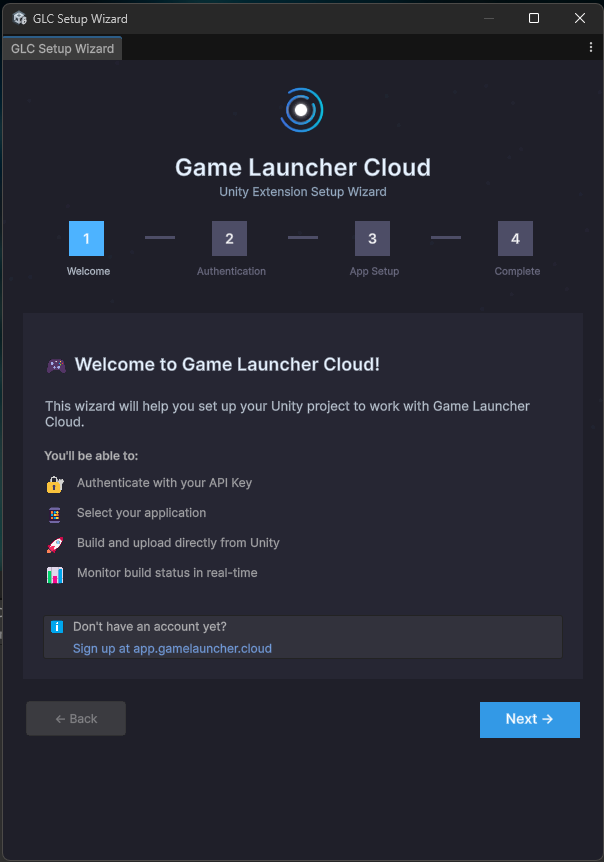
1. Open the **Setup Wizard** from `Tools > Game Launcher Cloud - Setup Wizard`
2. Follow the wizard steps:
* **Welcome**: Overview of features
* **Authentication**: Enter your API Key ([Get API Key](https://app.gamelaunchercloud.com/user/api-keys))
* **App Setup**: Select which application to upload builds to
* **Complete**: Start using the extension!
### Using the Manager Window
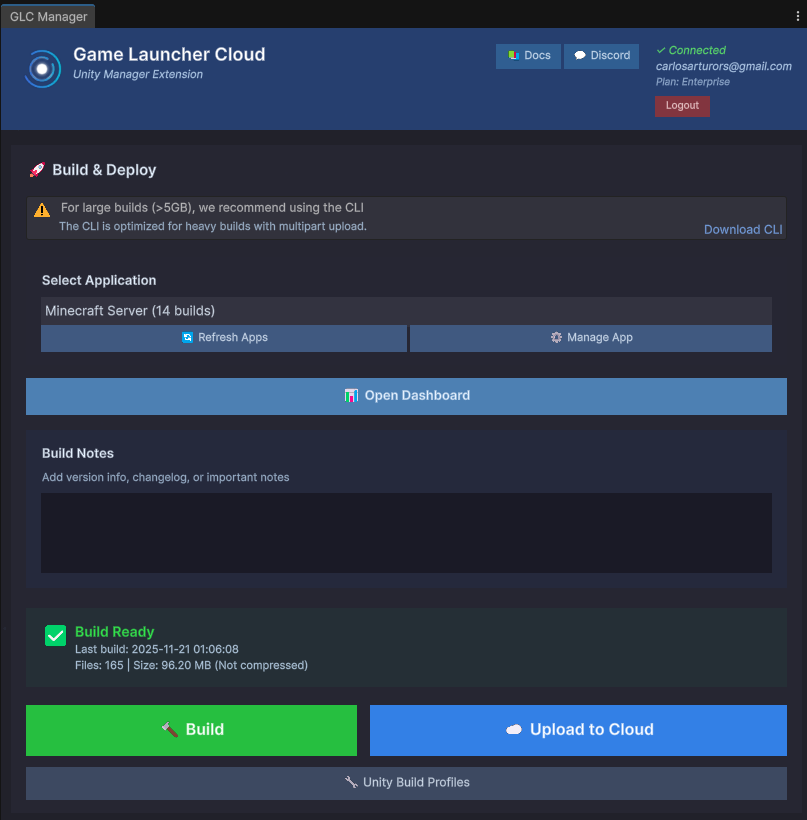
Open the **GLC Manager** from `Tools > Game Launcher Cloud - Manager`
#### Login Tab
* Connect your account using an API Key
* API Keys are saved per environment (Production/Staging/Development)
#### Build & Upload Tab
**Select Application**
* Choose which app to upload builds to
* Refresh apps list or manage app settings
**Build Notes**
* Add version info, changelog, or important notes for your build
**Build Actions**
* **Build**: Build your game without uploading
* **Upload to Cloud**: Upload an existing build
* **Build & Upload**: Build and upload in one step
**Build Status**
* Real-time monitoring of build processing
* View completed builds in the dashboard
## Requirements
* Unity 2019.4 or later
* Active Game Launcher Cloud account
* API Key with upload permissions
## Supported Platforms
* Windows (Standalone)
* Linux (Standalone)
* macOS (Standalone)
## Important Notes
* **Large Builds**: For builds larger than 5GB, we recommend using the [CLI](https://github.com/GameLauncherCloud/GameLauncherCloud-Gitbook/blob/main/docs/extensions/cli-builds.md) for better performance
* **Build Profiles**: Use Unity's Build Profiles (`File > Build Profiles`) to manage different build configurations
* **Compression**: Builds are automatically compressed before upload to optimize transfer speed
## 💬 Support
Need help? Join our [Discord Community](https://discord.com/invite/FpWvUQ2CJP) or visit the [Support Center](https://gamelauncher.cloud/support).