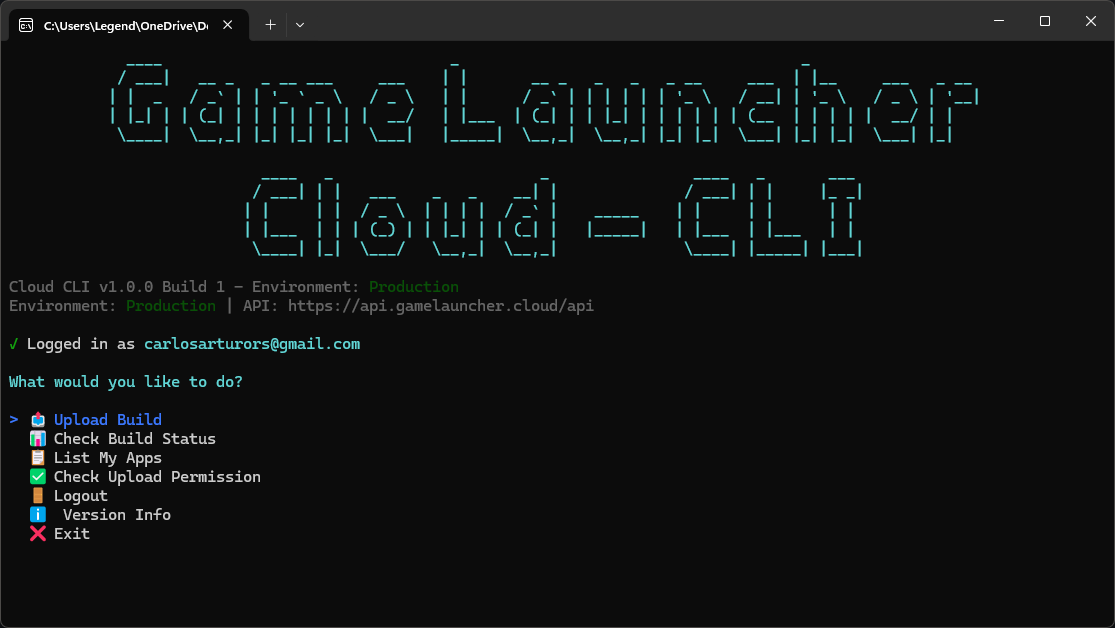
> For the complete documentation index, see [llms.txt](https://gamelauncher.cloud/help/llms.txt). Markdown versions of documentation pages are available by appending `.md` to page URLs; this page is available as [Markdown](https://gamelauncher.cloud/help/extensions/cli-releases/cli-builds.md).
# CLI Commands
Upload large game builds via command line
## Quick Start
{% hint style="success" %}
**Download here:** [CLI Releases](/help/extensions/cli-releases.md)\
\
**You need to know**\
Our CLI offers two modes: **Interactive** or by **Commands**
{% endhint %}
Upload larger builds directly to Cloudflare R2. Fast, secure, and perfect for CI/CD.
### 1. Login
Authenticate and save credentials locally.
```bash
gamelaunchercloud-cli login
```
* Login with Browser (Recommended)
* Create your API Key in the Dashboard:
* Login with email/password
### 2. List Apps
See all apps you can upload to (owned + team apps).
```bash
gamelaunchercloud-cli list-apps
```
### 3. Upload Build
Upload your game build (automatic multipart).
```bash
gamelaunchercloud-cli upload -a 1 -f "MyGame.zip" -n "Version 1.0"
```
### 4. Check Status
Monitor build processing in real-time.
```bash
gamelaunchercloud-cli status 224 --watch
```
### 5. Retry Failed Build (if needed)
Retry a failed or cancelled build without re-uploading.
```bash
gamelaunchercloud-cli retry 224
```
***
## Commands
### `login`
Authenticate with browser, api key, or email/password. Saves JWT token locally for future commands.
```bash
gamelaunchercloud-cli login
```
### `list-apps`
List all apps you have access to (yours + team apps).
```bash
gamelaunchercloud-cli list-apps
```
### `can-upload`
Check if you can upload a file (permissions + quota).
```bash
gamelaunchercloud-cli can-upload -a -f
```
### `upload`
Upload a build file. Calculates MD5 hash, uploads directly to R2, then notifies backend.
```bash
gamelaunchercloud-cli upload -a -f [-n "notes"]
```
**Options:**
* `-a, --app-id` - Application ID (get from `list-apps`)
* `-f, --file` - ZIP file path
* `-n, --notes` - Build notes/changelog
* `--no-status` - Skip status display after upload
**How it works:**
1. Requests presigned URL from backend
2. Uploads directly to Cloudflare R2 (multipart if > 100 MB)
3. Notifies backend to start processing
### `status`
Check build processing status. Use `--watch` to poll until complete.
```bash
gamelaunchercloud-cli status [--watch] [--json]
```
**Build Statuses:**
* `Pending` → `Enqueued` → `DownloadingBuild` → `UnzippingBuild` → `CreatingPatch` → `Completed`
* `Failed` - Check errorMessage for details
**Duration Fields:**
* **Upload Duration** - Time to upload file to R2 (shown immediately)
* **Total Duration** - Complete processing time (only shown when Completed)
### `retry`
Retry a failed or cancelled build using the already uploaded file. This saves time and bandwidth by reusing the original upload.
```bash
gamelaunchercloud-cli retry [--watch]
```
**Options:**
* `` - The build ID to retry (required)
* `--watch` - Monitor the retried build continuously (optional, default: true)
**Requirements:**
* Build must have `Failed` or `Cancelled` status
* Original uploaded file must still exist in storage
* Build must be from your apps or team apps
**Example:**
```bash
# Retry a failed build and watch progress
$ gamelaunchercloud-cli retry 224
Checking build #224...
✓ Build retry initiated successfully!
Watching build #224...
Press Ctrl+C to stop watching
╭─📊 Build Status──────────────────────╮
│ Build ID: #224 │
│ Status: ⏳ Enqueued │
│ File: MyGame_v1.2.0.zip │
│ Compressed Size: 2.01 GB │
╰──────────────────────────────────────╯
# ... (updates every 5 seconds until completed)
```
**When to use:**
* Build failed due to temporary server issues
* Build was cancelled accidentally
* Processing error occurred during patch creation
***
## Ignore Paths
Exclude specific files and folders from patch generation. This feature helps reduce patch sizes and prevents temporary or user-specific files from being included in updates.
### Configuration
Ignore paths are configured per application in the dashboard:
**App Settings → Build & Patch → Ignored Paths**
Each app can have its own set of ignored paths that apply to all future builds.
### Default Ignored Paths
The system automatically adds:
* `*output_log.txt` - Launcher log files
* `SelfUpdater\` - Auto-updater files (for Apps, not Launchers)
### Custom Ignored Paths
Add paths in the dashboard (one per line):
```
logs\
*.tmp
cache\*.dat
debug_output.txt
UserData\saves\
```
### Path Syntax
* **Directories:** End with `\` (Windows) or `/` (Linux/Mac)
* **Wildcards:** Use `*` to match multiple files (e.g., `*.log`)
* **Relative paths:** All paths are relative to build root
* **Case-sensitive:** Paths are case-sensitive on Linux/Mac
**Examples:**
| Path | Description |
| ------------------ | --------------------------------- |
| `logs\` | Ignore entire logs folder |
| `*.tmp` | Ignore all .tmp files |
| `cache\*.dat` | Ignore .dat files in cache folder |
| `debug_output.txt` | Ignore specific file |
| `Temp\` | Ignore Temp folder |
| `*_backup.json` | Ignore all backup JSON files |
### How It Works
1. **Upload:** You upload a build ZIP containing all files
2. **Extract:** Backend extracts the build to temporary storage
3. **Patch Creation:** PatchManager compares with previous build and creates patches
* Files matching ignored paths are **excluded from patches**
* Ignored files are not tracked for updates
4. **Distribution:** Clients only download changed files (excluding ignored paths)
### Benefits
* **Smaller patches:** Exclude logs, cache, and temporary files
* **Faster downloads:** Less data to transfer to end-users
* **Cleaner updates:** Avoid overwriting user-specific files
* **Flexibility:** Configure once, applies to all future builds
### Limits
* Maximum **100 paths** per application
* Maximum **500 characters** per path
* No duplicate paths allowed
* Validation occurs when saving in dashboard
### Best Practices
* Ignore log files and crash dumps
* Ignore user-generated content folders
* Ignore platform-specific cache files
* Test with a small build first to verify paths work correctly
***
## Complete Example
Full workflow from login to upload completion.
```bash
# Step 1: Login (first time only)
$ gamelaunchercloud-cli login
Email: dev@example.com
Password: ********
✓ Login successful!
# Step 2: List your apps
$ gamelaunchercloud-cli list-apps
╭─🎮 Applications───────────────────────╮
│ ID │ Name │ Builds │ Owner │
├────┼────────────────┼────────┼────────┤
│ 1 │ My Game │ 15 │ You │
│ 2 │ Racing Game │ 8 │ Team │
╰────┴────────────────┴────────┴────────╯
# Step 3: Upload your build
$ gamelaunchercloud-cli upload -a 1 -f "MyGame_v1.2.0.zip" -n "Bug fixes and new features"
╭─🚀 Upload Build──────────────────────╮
│ App: My Game (#1) │
│ File: MyGame_v1.2.0.zip │
│ Size: 2.01 GB │
╰──────────────────────────────────────╯
Step 1/3: Requesting upload URL...
✓ Upload URL obtained (Build ID: #224)
Step 2/3: Uploading to cloud storage...
Uploading... ━━━━━━━━━━━━━━━━━━━━━━━ 100%
✓ Upload completed in 1m 41s
Average speed: 20.34 MB/s
Step 3/3: Notifying backend...
✓ Backend notified successfully
╔══════════════════════════════════════╗
║ 🎉 Build uploaded successfully! ║
║ Build ID: #224 ║
╚══════════════════════════════════════╝
# Step 4: Monitor processing (optional)
$ gamelaunchercloud-cli status 224 --watch
╭─📊 Build Status──────────────────────╮
│ Build ID: #224 │
│ Status: ⬇️ DownloadingBuild │
│ Compressed Size: 2.01 GB │
│ Upload Duration: 1m 41s │
╰──────────────────────────────────────╯
# ... (updates every 5 seconds) ...
╭─📊 Build Status──────────────────────╮
│ Build ID: #224 │
│ Status: ✅ Completed │
│ Compressed Size: 2.01 GB (55% saved) │
│ Upload Duration: 1m 41s │
│ Total Duration: 5m 6s │
╰──────────────────────────────────────╯
✓ Build completed successfully!
```
***
## CI/CD Examples
Automate build uploads on every release tag.
### GitHub Actions
Triggers on version tags (e.g., v1.0.0).
```yaml
name: Upload Build
on:
push:
tags: ["v*"] # Runs on v1.0.0, v2.0.1, etc.
jobs:
upload:
runs-on: ubuntu-latest
steps:
- uses: actions/checkout@v3
- name: Build
run: |
# Your build process
zip -r game-build.zip dist/
- name: Login
id: login
run: |
RESPONSE=$(curl -s -X POST "${{ secrets.GLC_API_URL }}/api/cli/build/login" \
-H "Content-Type: application/json" \
-d '{"email":"${{ secrets.GLC_EMAIL }}","password":"${{ secrets.GLC_PASSWORD }}"}')
TOKEN=$(echo $RESPONSE | jq -r '.result.token')
echo "token=$TOKEN" >> $GITHUB_OUTPUT
- name: Upload
run: |
FILE_SIZE=$(stat -c%s game-build.zip)
# Start upload
START=$(curl -s -X POST "${{ secrets.GLC_API_URL }}/api/cli/build/start-upload" \
-H "Authorization: Bearer ${{ steps.login.outputs.token }}" \
-H "Content-Type: application/json" \
-d "{\"appId\":${{ secrets.GLC_APP_ID }},\"fileName\":\"game-build.zip\",\"fileSize\":$FILE_SIZE,\"buildNotes\":\"Build ${{ github.ref_name }}\"}")
UPLOAD_URL=$(echo $START | jq -r '.result.uploadUrl')
BUILD_ID=$(echo $START | jq -r '.result.appBuildId')
KEY=$(echo $START | jq -r '.result.key')
# Upload to R2
curl -X PUT "$UPLOAD_URL" \
-H "Content-Type: application/octet-stream" \
--data-binary @game-build.zip
# Notify
curl -s -X POST "${{ secrets.GLC_API_URL }}/api/cli/build/file-ready" \
-H "Authorization: Bearer ${{ steps.login.outputs.token }}" \
-H "Content-Type: application/json" \
-d "{\"appBuildId\":$BUILD_ID,\"key\":\"$KEY\"}"
```
**Required Secrets:** (Settings → Secrets)
* `GLC_API_URL`: `https://api.gamelauncher.cloud`
* `GLC_EMAIL`: Your email
* `GLC_PASSWORD`: Your password
* `GLC_APP_ID`: Application ID (from `list-apps`)
### GitLab CI
Triggers on version tags.
```yaml
stages:
- build
- upload
upload_build:
stage: upload
only:
- tags # Only runs on tags
script:
- zip -r game-build.zip dist/
- FILE_SIZE=$(stat -c%s game-build.zip)
# Login
- |
RESPONSE=$(curl -s -X POST "$GLC_API_URL/api/cli/build/login" \
-H "Content-Type: application/json" \
-d "{\"email\":\"$GLC_EMAIL\",\"password\":\"$GLC_PASSWORD\"}")
TOKEN=$(echo $RESPONSE | jq -r '.result.token')
# Start upload
- |
START=$(curl -s -X POST "$GLC_API_URL/api/cli/build/start-upload" \
-H "Authorization: Bearer $TOKEN" \
-H "Content-Type: application/json" \
-d "{\"appId\":$GLC_APP_ID,\"fileName\":\"game-build.zip\",\"fileSize\":$FILE_SIZE,\"buildNotes\":\"Build $CI_COMMIT_TAG\"}")
UPLOAD_URL=$(echo $START | jq -r '.result.uploadUrl')
BUILD_ID=$(echo $START | jq -r '.result.appBuildId')
KEY=$(echo $START | jq -r '.result.key')
# Upload to R2
- curl -X PUT "$UPLOAD_URL" -H "Content-Type: application/octet-stream" --data-binary @game-build.zip
# Notify
- |
curl -s -X POST "$GLC_API_URL/api/cli/build/file-ready" \
-H "Authorization: Bearer $TOKEN" \
-H "Content-Type: application/json" \
-d "{\"appBuildId\":$BUILD_ID,\"key\":\"$KEY\"}"
```
**Variables:** (Settings → CI/CD → Variables)
* `GLC_API_URL`, `GLC_EMAIL`, `GLC_PASSWORD`, `GLC_APP_ID`
### Bash Script
Simple script for custom workflows.
```bash
#!/bin/bash
API_URL="https://api.gamelauncher.cloud"
EMAIL="user@example.com"
PASSWORD="password"
APP_ID=1
FILE="game.zip"
FILE_SIZE=$(stat -c%s "$FILE") # Get file size in bytes
# Step 1: Login and get token
TOKEN=$(curl -s -X POST "$API_URL/api/cli/build/login" \
-H "Content-Type: application/json" \
-d "{\"email\":\"$EMAIL\",\"password\":\"$PASSWORD\"}" | jq -r '.result.token')
# Step 2: Request presigned URL
START=$(curl -s -X POST "$API_URL/api/cli/build/start-upload" \
-H "Authorization: Bearer $TOKEN" \
-H "Content-Type: application/json" \
-d "{\"appId\":$APP_ID,\"fileName\":\"$FILE\",\"fileSize\":$FILE_SIZE}")
UPLOAD_URL=$(echo $START | jq -r '.result.uploadUrl')
BUILD_ID=$(echo $START | jq -r '.result.appBuildId')
KEY=$(echo $START | jq -r '.result.key')
# Step 3: Upload directly to R2
curl -X PUT "$UPLOAD_URL" -H "Content-Type: application/octet-stream" --data-binary @"$FILE"
# Step 4: Notify backend
curl -s -X POST "$API_URL/api/cli/build/file-ready" \
-H "Authorization: Bearer $TOKEN" \
-H "Content-Type: application/json" \
-d "{\"appBuildId\":$BUILD_ID,\"key\":\"$KEY\"}"
echo "✓ Upload complete! Build ID: $BUILD_ID"
```
***
## Troubleshooting
Common issues and quick fixes.
| Problem | Solution |
| --------------------------- | ------------------------------------------------ |
| "Not authenticated" | Token expired. Run `login` again |
| "App not found" | Wrong app ID. Check with `list-apps` |
| "Upload failed" | Network issue. Check connection and retry |
| Build stuck in "Processing" | Large builds take 5-10 min. Use `status --watch` |
| "Email not confirmed" | Verify email in dashboard first |
***
## Configuration
Credentials are stored locally (JWT token + email).
**Config file location:**
* Windows: `%APPDATA%\GameLauncherCloud\config.json`
* macOS: `~/Library/Application Support/GameLauncherCloud/config.json`
* Linux: `~/.config/gamelaunchercloud/config.json`
**To reset:** Delete config file and run `login` again.
***
## Next Steps
* [CLI Releases](/help/extensions/cli-releases.md) - Download CLI binaries
* [Upload with the CLI Tool](/help/applications/upload-builds/upload-builds-cli.md) - Step by step upload guide
* [Upload from the Dashboard](/help/applications/upload-builds/upload-builds-dashboard.md) - Upload builds via the browser (up to 5 GB)
* [Environments](/help/applications/environments.md) - Configure staging/production
{% hint style="success" %}
**Need Help?** Join [Discord](https://discord.com/invite/FpWvUQ2CJP) or email
{% endhint %}
---
# Agent Instructions
This documentation is published with GitBook. GitBook is the documentation platform designed so that both humans and AI agents can read, navigate, and reason over technical content effectively. Learn more at gitbook.com.
## Querying This Documentation
If you need additional information that is not directly available in this page, you can query the documentation by asking a question.
Perform an HTTP GET request on the following URL with the `ask` and `goal` query parameters:
```
GET https://gamelauncher.cloud/help/extensions/cli-releases/cli-builds.md?ask=&goal=
```
`ask` is the immediate question: it should be specific, self-contained, and written in natural language.
`goal` is what the user is ultimately trying to achieve, the reason they need the answer. Sharing it helps GitBook give you a better, more relevant answer. A goal is most helpful when it describes the outcome the user wants rather than restating the question. For example, with `ask=how do I create an API token`, a goal like `automate deployments from our CI pipeline` lets GitBook tailor the answer to that use case.
The response will contain a direct answer to the question and relevant excerpts and sources from the documentation.
Use this mechanism when the answer is not explicitly present in the current page, you need clarification or additional context, or you want to retrieve related documentation sections.