# March 22, 2026

## Dashboard

### Launcher Builder

{% hint style="success" %}
**NEW FEATURE:** Introducing the **Launcher Builder** — a fully integrated visual editor to design and customize every aspect of your launcher in one place.
{% endhint %}

<div data-full-width="true"><figure><img src="/files/qglQRNxmRvk1JXhXlkbE" alt=""><figcaption><p>Launcher Builder</p></figcaption></figure></div>

The new **Launcher Builder** brings together all launcher customization options into a single, unified interface. Settings that were previously scattered across multiple pages are now accessible directly from the builder, making it faster and easier to design your launcher.

***

### Presets

{% hint style="info" %}
**NEW:** Start with a preset and customize from there — or build from scratch.
{% endhint %}

<figure><img src="/files/iy7F3mDXawlEZLFP73Dh" alt=""><figcaption><p>Presets selector</p></figcaption></figure>

Choose from a collection of ready-made launcher presets to jumpstart your design. Each preset provides a fully configured starting point that you can further customize to match your game's branding.

<div data-full-width="true"><figure><img src="/files/uZVdaZARkcJuLqlB5DcY" alt=""><figcaption><p>Horror Game Example</p></figcaption></figure></div>

<div data-full-width="true"><figure><img src="/files/beHOuITxs7V4fSZzuy0o" alt=""><figcaption><p>SCI-FI / Cyber Example</p></figcaption></figure></div>

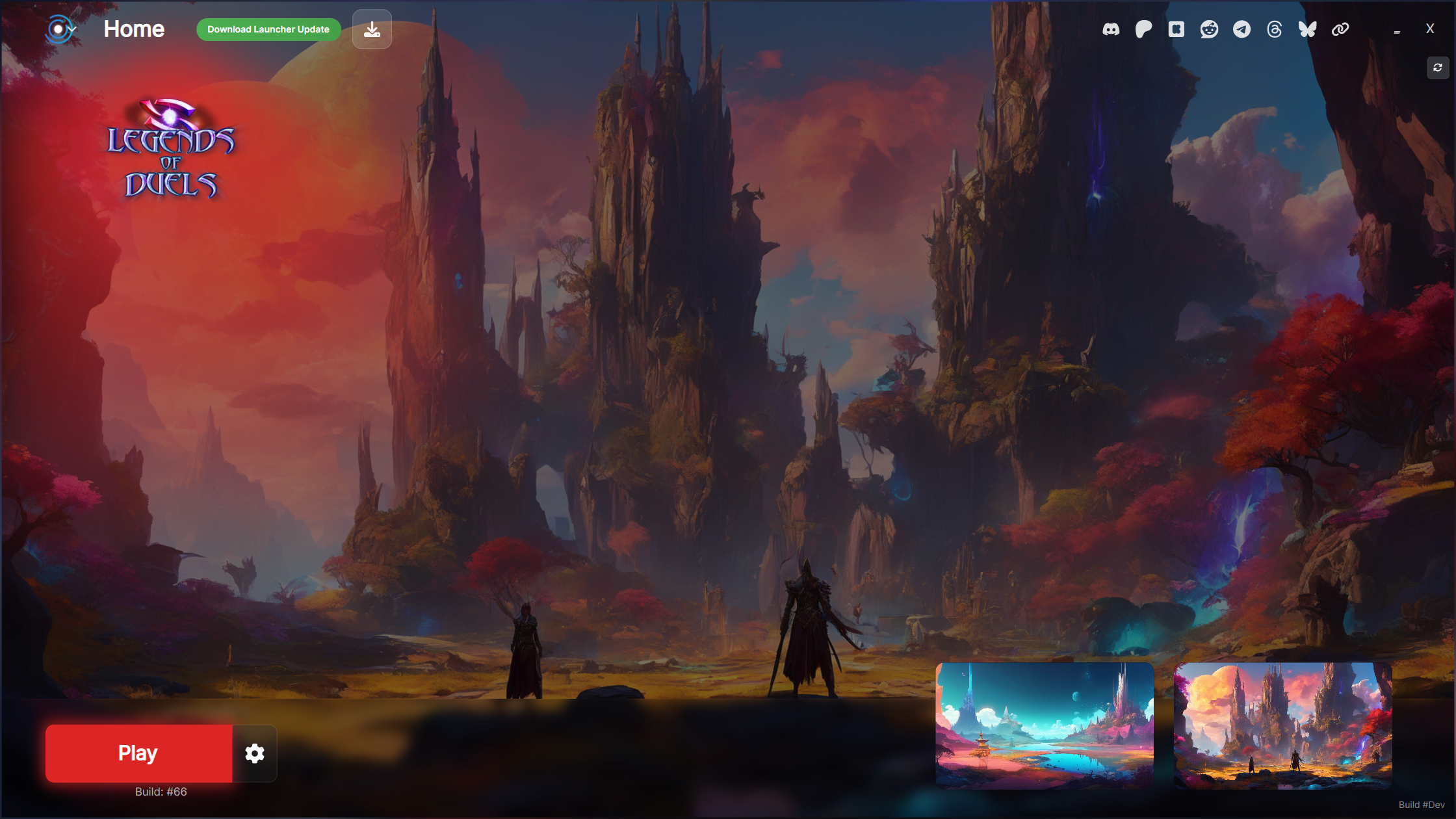
<div data-full-width="true"><figure><img src="/files/15IfvFl1ob2pj9SXzRAa" alt=""><figcaption><p>Fantasy MMO / RPG Example</p></figcaption></figure></div>

<div data-full-width="true"><figure><img src="/files/pDbQfkMZMGmsU11QABTn" alt=""><figcaption><p>Military / FPS Example</p></figcaption></figure></div>

***

### NEW Progress Bars

**Horizontal Progress Bar**

<div data-full-width="true"><figure><img src="/files/dPOfcTC5bMuce4q372mk" alt=""><figcaption><p>Horizontal Progress Bar with Pinned News</p></figcaption></figure></div>

#### Circular Progress Bar

<figure><img src="/files/jOumhMKMu4Tk3gmwz10O" alt=""><figcaption><p>Circular Progress Bar</p></figcaption></figure>

***

### NEW Button Styles

Set new button styles to match your game style!

#### **Textures**

<figure><img src="/files/ZDlbf4Yhg1lq0qCfiWza" alt=""><figcaption><p>Play Button Style: Texture, Integrated App Settings, Rounded (20px)</p></figcaption></figure>

#### Glow

<figure><img src="/files/b0Kz9QR5WXsgRm24xozd" alt=""><figcaption><p>Play Button Style: Glow, Integrated App Settings (dropdown mode), Rounded (5px)</p></figcaption></figure>

***

### NEW App Settings Styles

Set new app settings style to match your game style!

#### Integrated: App Settings with same color

<figure><img src="/files/vOscPpYWuPi4xV5u0YKK" alt=""><figcaption><p>Play Button with Integrated App Settings (same color)</p></figcaption></figure>

#### Floating

<figure><img src="/files/9uUOOf2ipTLm2hl1AYlN" alt=""><figcaption><p>Play Button with Glow with Floating App Settings</p></figcaption></figure>

#### Separated

<figure><img src="/files/kIOiRT93Wac3E0ReCU1I" alt=""><figcaption><p>Play Button with App Settings button (separated)</p></figcaption></figure>

#### Integrated: Environment dropdown

<figure><img src="/files/hinFAkvn4SKjxFef1VEE" alt=""><figcaption><p>Play Button with integrated Environment dropdown</p></figcaption></figure>

***

### NEW Social Icons Styles

Configure your social media links directly within the builder.

#### Clean

<div data-full-width="false"><figure><img src="/files/NFyG42S3kEacfUs6tpjq" alt=""><figcaption><p>Social Icons: Clean Style</p></figcaption></figure></div>

#### Color

<figure><img src="/files/ag1lJ241lb7dP6xWMRMg" alt=""><figcaption><p>Social Icons: Color Style with Background</p></figcaption></figure>

***

### Layouts

#### Left to Right (LTR) or Right to Left (RTL) Layout

<div data-full-width="true"><figure><img src="/files/ulxHhfl6w3jUAikzzUs0" alt=""><figcaption><p>RTL Layout with bottom panel</p></figcaption></figure></div>

#### LTR + Bottom Panel with RTL

<div data-full-width="true"><figure><img src="/files/UTEaJE9iwF55xttmTIgb" alt=""><figcaption><p>LTR Layout with Bottom Panel with RTL</p></figcaption></figure></div>

#### NEW Bottom Panel

Now you can enable the bottom panel to match your game style!

#### Glass Style

<div data-full-width="true"><figure><img src="/files/vpjfTLTNNQntv85N0xHD" alt=""><figcaption><p>Glass Style Bottom Panel</p></figcaption></figure></div>

#### Dark

<div data-full-width="true"><figure><img src="/files/GffsA5GwIvYB2tuNuCsJ" alt=""><figcaption><p>Dark Style Bottom Panel</p></figcaption></figure></div>

{% hint style="info" %}
**Need Help?** Check out our [Help Center](https://help.gamelauncher.cloud/) or join our [Discord Community](https://discord.gamelauncher.cloud)!
{% endhint %}


---

# Agent Instructions: Querying This Documentation

If you need additional information that is not directly available in this page, you can query the documentation dynamically by asking a question.

Perform an HTTP GET request on the current page URL with the `ask` query parameter:

```
GET https://gamelauncher.cloud/help/changelog/2026/march-22-2026.md?ask=<question>
```

The question should be specific, self-contained, and written in natural language.
The response will contain a direct answer to the question and relevant excerpts and sources from the documentation.

Use this mechanism when the answer is not explicitly present in the current page, you need clarification or additional context, or you want to retrieve related documentation sections.