# April 13, 2026

## Dashboard

### Builder AI Chat

{% hint style="success" %}
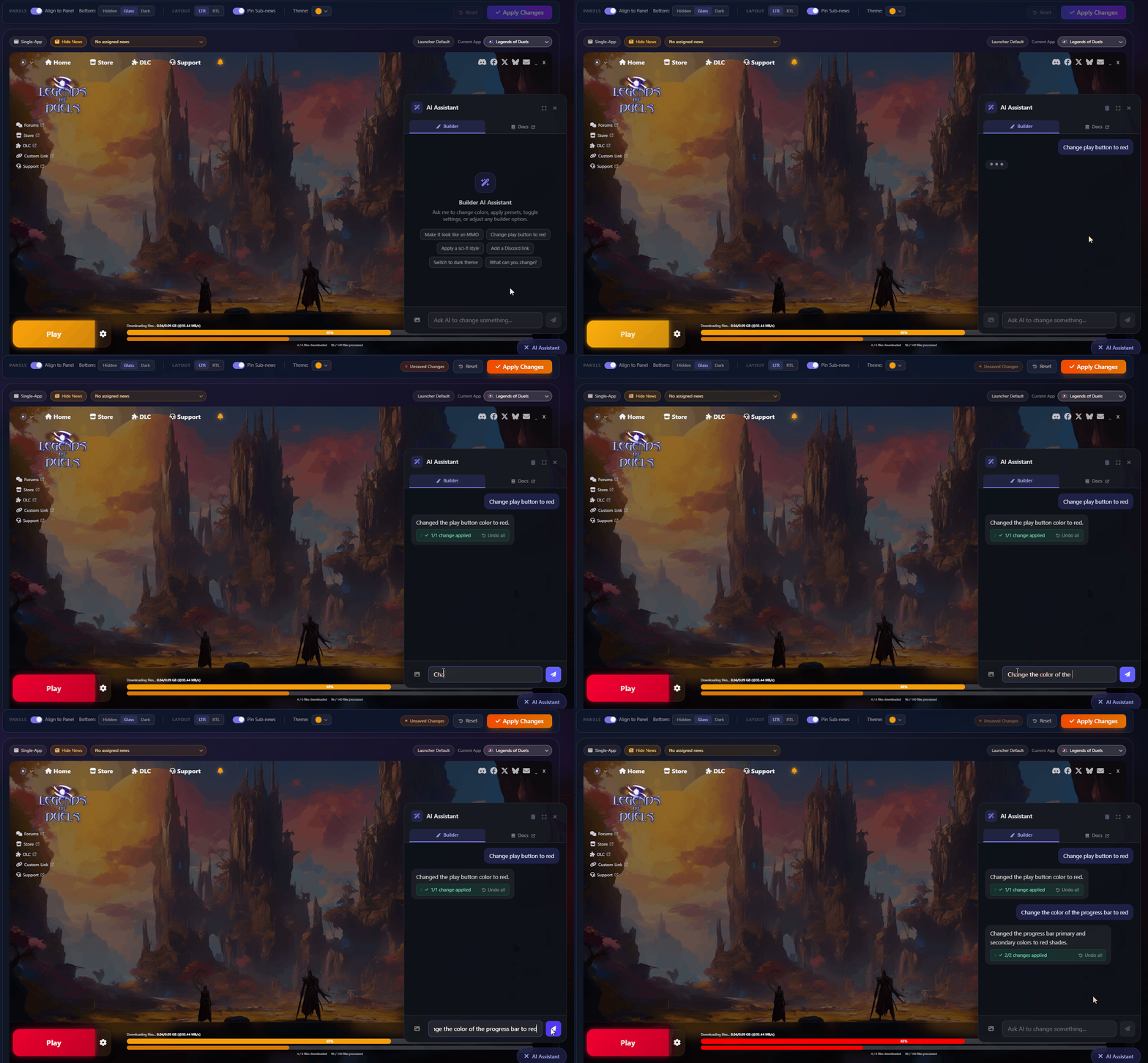
**NEW FEATURE:** The Launcher Builder now includes an integrated **AI Chat assistant** to help you design and configure your launcher.
{% endhint %}

<div data-full-width="false"><figure><img src="/files/ox3j2VTtT8Fu43tTcDOl" alt=""><figcaption><p>AI Assistant for Launcher Builder</p></figcaption></figure></div>

The new **Builder AI Chat** panel lets you interact with an AI assistant directly inside the Launcher Builder. Ask questions, get suggestions, and receive real-time guidance while customizing your launcher — all without leaving the editor.

Key capabilities:

* **Contextual help** — The assistant understands your current builder state and provides relevant suggestions.
* **Preview tooltips** — Hover over AI suggestions to preview how changes will look before applying them.
* **Conversational interface** — Chat naturally to explore configuration options and get step-by-step guidance.

***

### Icon and Icon-only support for links

<figure><img src="/files/86jOQNDVNlmkFXP1Kujf" alt=""><figcaption><p>Icon Only</p></figcaption></figure>

#### DLC Link Support

{% hint style="info" %}
**NEW:** External links can now be configured as **DLC links** with icon-only navigation support.
{% endhint %}

<figure><img src="/files/KnFfRvtJnebBn5mWbiqD" alt=""><figcaption><p>Icon + Text</p></figcaption></figure>

You can now designate links as DLC links in the builder. Combined with the new **icon-only mode**, navigation links can display just their icon — saving space while keeping navigation accessible. A new **Home navigation** option is also available for quick access to the main page.

***

### Downloads Button Settings

<figure><img src="/files/ROUXzi8vfgYwSbjtiqqJ" alt=""><figcaption><p>Downloads Button</p></figcaption></figure>

The builder now includes a dedicated **Downloads Button** toggle and preview. When enabled, a Downloads shortcut button appears in the launcher's top navigation bar, giving players quick access to manage their downloads.

***

### Launcher Update Settings

<figure><img src="/files/1wCkBjNvxwCgWve9As9s" alt=""><figcaption><p>Launcher Update Settings</p></figcaption></figure>

New **launcher update toggles** let you control auto-update behavior directly from the builder. Configure whether the launcher checks for updates on startup and how update notifications are displayed to players.

***

## Launcher Desktop

### News Alert Notifications

{% hint style="success" %}
**NEW FEATURE:** The launcher top navigation bar now supports **alert notifications** for news and announcements.
{% endhint %}

<figure><img src="/files/Gx6uN7RYk11UaVMjKsyG" alt=""><figcaption><p>Alerts as a expandable Icon</p></figcaption></figure>

Alert notifications appear in the **NavBar** and can be expanded or collapsed by the player. Developers can configure alerts from the dashboard to communicate important updates, events, or announcements directly within the launcher.

***

### Icon-Only Navigation

<figure><img src="/files/6DiVIGryikmosrtmkRYB" alt=""><figcaption><p>Icon Only navigation links</p></figcaption></figure>

Navigation links now support an **icon-only display mode** — showing just the icon without text labels. This creates a cleaner, more compact navigation bar, especially useful for launchers with many links.

Icons have been normalized across the navigation system for consistent sizing and alignment.

***

### Configurable Downloads Button

<figure><img src="/files/FN0uuRMfyCj47X660bv0" alt=""><figcaption><p>Downloads Button - No background, right side</p></figcaption></figure>

A new **Downloads** button can now appear in the top navigation bar. When enabled from the dashboard, players get one-click access to the downloads manager without navigating through menus.

***

### Launcher Update UI

The launcher now includes a dedicated **update settings interface**, allowing the update behavior configured in the dashboard to be reflected in the launcher's settings panel.

<figure><img src="/files/wZpSI9kKh0z9TnkR5uzL" alt=""><figcaption><p>Launcher Update inside Launcher Dropdown</p></figcaption></figure>

<figure><img src="/files/Y58RomPaLp6M2ePC5yyp" alt=""><figcaption><p>Launcher Update inside App Settings Dropdown</p></figcaption></figure>

***

### Top Navigation Hover Effects

{% hint style="info" %}
**IMPROVED:** Top navigation icons now feature **hover and press effects** with smooth opacity transitions for better visual feedback.
{% endhint %}

***

## Fixes

* Now you can ask to the AI in Gitbook

## Other Changes

* Refactored build management UI in the dashboard for improved clarity and added model field support.
* Minor formatting and code readability improvements across builder component templates.
* Now you can add spaces in **Exclude Files and Folders from Updates** for each app

***

{% hint style="info" %}
**Need Help?** Check out our [Help Center](https://help.gamelauncher.cloud/) or join our [Discord Community](https://discord.gamelauncher.cloud)!
{% endhint %}


---

# Agent Instructions: Querying This Documentation

If you need additional information that is not directly available in this page, you can query the documentation dynamically by asking a question.

Perform an HTTP GET request on the current page URL with the `ask` query parameter:

```
GET https://gamelauncher.cloud/help/changelog/2026/april-13-2026.md?ask=<question>
```

The question should be specific, self-contained, and written in natural language.
The response will contain a direct answer to the question and relevant excerpts and sources from the documentation.

Use this mechanism when the answer is not explicitly present in the current page, you need clarification or additional context, or you want to retrieve related documentation sections.