For the complete documentation index, see llms.txt. This page is also available as Markdown.

December 14, 2025

Smart Bundles technology for optimized downloads, Launcher Build Management, xxHash64 implementation and much more


πŸ–₯️ Desktop

[NEW] Smart Bundles Technology

Previous Method vs Smart Bundles

Example: A 1.16 GB game with 309 files is now 1.07 GB with only 5 files because most of its assets were small files.

What's New:

  • Smart Bundles - Automatic grouping of small files into optimized packages

  • Faster Downloads - Dramatically reduced overhead for games with many small files

  • Efficient Storage - Better compression and organization of game assets

  • Adaptive System - Intelligently bundles files based on size and update patterns

  • Build Metrics - Track bundle counts, sizes, and file counts per build

How It Works:

Small files (less than 5 MB) are automatically bundled during patch generation. The launcher downloads and extracts these bundles seamlessly, providing a much faster experience especially for games with thousands of small assets.

Performance Impact:

~20% additional storage overhead during patch generation for bundle optimization, but significantly faster download speeds for end users.


[NEW] Global Minimum Version Enforcement

What's New:

  • Project Metadata Update - Updated versioning and project configuration in csproj files

  • Automatic Version Check - Launcher enforces minimum version requirements on startup

  • Forced Updates - If the launcher version is older than the minimum required version, it will be forced to update

  • User Protection - Ensures all users are on supported versions with latest security and performance improvements

  • Platform Access Control - Prevents outdated launchers from accessing the platform

Impact:

This ensures all users maintain compatible launcher versions and benefit from the latest performance improvements and security updates.


⚑ Core Features

GameLauncherCore (v2.1.1.0)

[NEW] xxHash64 Implementation

What Changed:

  • xxHash64 is Now Primary - xxHash64 is now the primary hashing method for all new patch operations

  • Optional MD5 Support - MD5 hash generation available for backward compatibility when needed

  • Massive Speed Boost - Hash calculation is now significantly faster during:

    • Patch creation and generation (local and server-side)

    • File verification during downloads

    • Build integrity checks

    • Update detection processes

    • Server-side build processing

Performance Impact:

xxHash64 is up to 10-20x faster than MD5, resulting in:

  • Faster patch generation - Developers can create patches much quicker (both locally and via CLI)

  • Faster file verification - End users experience shorter verification times

  • Reduced CPU usage - More efficient processing during build creation

  • Quicker update checks - Faster comparison of file states

  • Faster server-side processing - Backend API generates patches significantly faster, reducing build queue times and server load

Compatibility & Migration:

  • Backward Compatible - The launcher is fully compatible with existing patches created with MD5

  • Automatic Detection - System automatically detects which hash algorithm was used for each patch

  • Old Patches (MD5) - Previously created patches continue working without any issues

  • New Patches (xxHash64) - All newly created patches automatically use the faster xxHash64 algorithm

  • To Take Advantage - Create a new patch for your game and update the launcher to benefit from the massive speed improvements

This is a fundamental performance improvement that affects every aspect of the patching and verification system, from server-side build generation to end-user file verification.


🌐 Dashboard

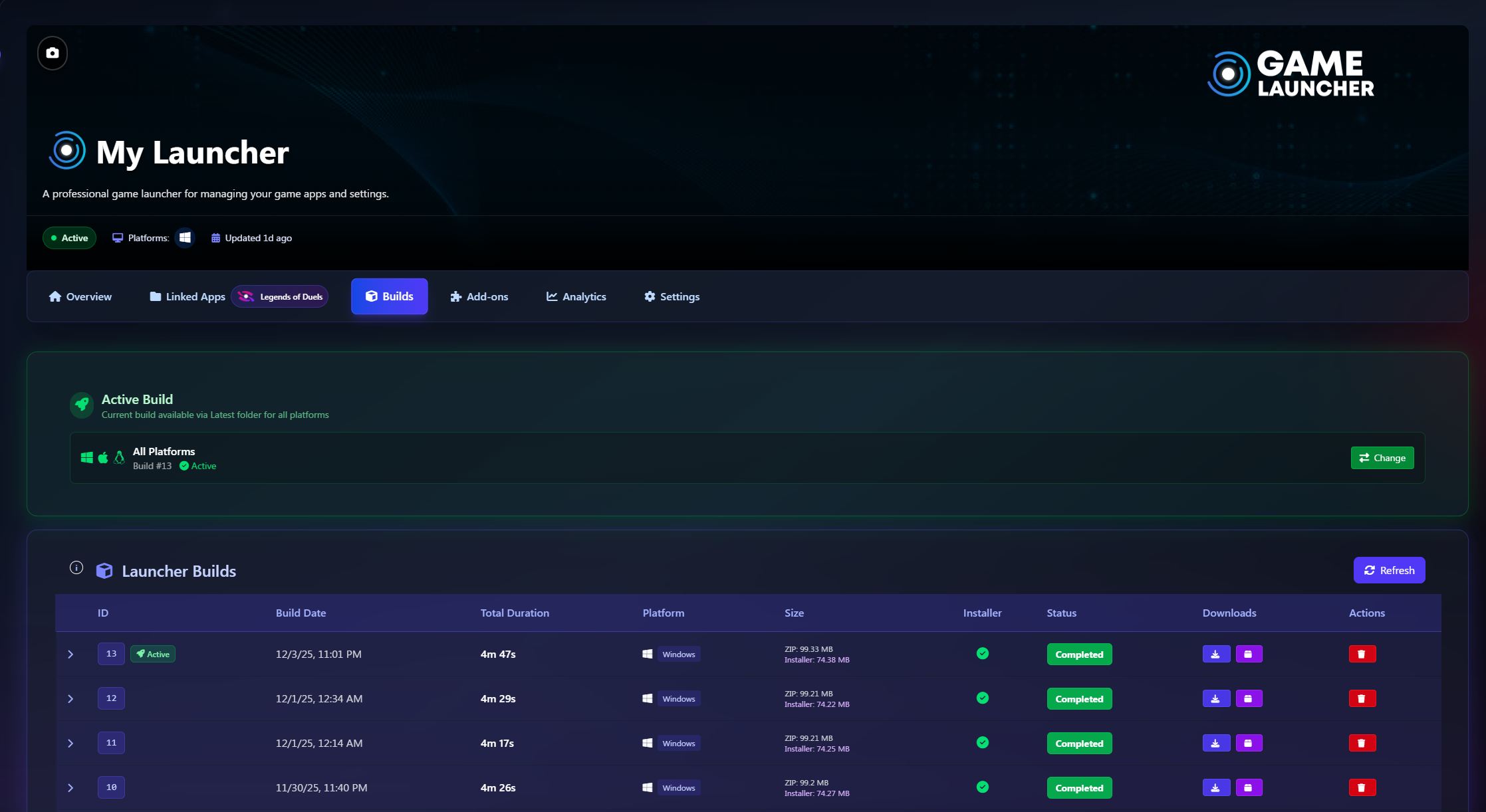
[NEW] Launcher Build Management System

NEW - Launcher Builds Tab

What's New:

  • Builds Tab - New dedicated section in launcher settings for build management

  • Active Build Selection - Choose which build version users download

  • Protected Deletion - Cannot delete the currently active build (safety feature)

  • Multiple Download Formats:

    • Windows Installer (.exe)

    • Portable ZIP package

  • Copy Download Links - Share direct download URLs with one click

  • Detailed Build Metrics:

    • Executable ZIP upload duration

    • Installer upload duration

    • Total build time

    • File sizes and configuration

  • Visual Preview - View launcher icon and splash screen directly in the list

  • Build History - Keep track of all previous launcher versions

Where to Find:

Dashboard β†’ Launchers β†’ Select Launcher β†’ Builds Tab


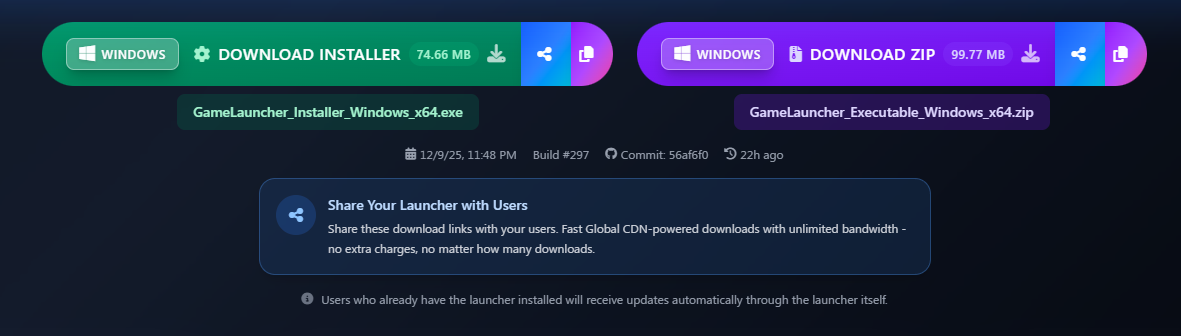
[NEW] Persistent Download URLs & Copy to Clipboard

NEW - Persitent download urls & copy to clipboard button

What's New:

  • Copy to Clipboard - One-click copy for both Installer and ZIP download links

  • Persistent Latest URLs - Download links always point to the same URL structure

  • Latest Folder System - Active build files automatically copied to /Latest/ folder

  • Automatic Updates - When you activate a new build, the Latest folder updates automatically

How It Works:

Previously, download URLs changed with each build number (e.g., Build_297/). Now, the active build is always available at a consistent URL:

Benefits:

  • Single Download Link - Share one permanent URL with your users

  • Always Current - Users always download the active build version

  • Easy Sharing - Copy button makes it simple to distribute links

  • CDN Powered - Fast global downloads via Cloudflare CDN

When you activate a different build, the files in the Latest folder are automatically replaced with the newly selected active build.


[IMPROVED] Frontend Enhancements

What's New:

  • Outdated Launcher Alerts - Visual alerts when launcher builds are outdated or need updates

  • Refactored Retry Logic - Retry builds now create a new build instead of overwriting

  • Enhanced Build Info Display - Retry information and status clearly visible in UI

  • Streamlined Environment Switching - Removed confirmation requirement when setting builds to environments

  • Cache-Busting & Cache Control - Implemented cache management for frontend assets

  • GitHub Commit Display - GitHub commit changes in launcher overview now appear as "New Launcher Update"


[NEW] Image History & Restoration

NEW - Restore previous image in the launcher deploy
NEW - Restore previous images in the launcher and app assets

What's New:

  • One-Click Restoration - Restore previous versions of:

    • Icon

    • Logo

    • Banner

    • Background

    • Splash Screen

  • Automatic Tracking - System automatically stores previous image URLs

  • Better Deploy Detection - More accurate tracking of changes that require redeployment

  • Works for Apps & Launchers - Available in both appearance settings

Where to Find:

  • Launchers: Settings β†’ Appearance β†’ Image Assets β†’ Restore buttons

  • Apps: Settings β†’ Appearance β†’ Image Assets β†’ Restore buttons


[NEW] Template Section UI

NEW - Template seleector for Launcher
What's New:

  • Template Section - New UI section for template selection (coming soon)

  • Disabled Dropdown - Placeholder for future template system

  • Informational Message - Clear explanation of upcoming features

This prepares the UI for future template functionality where users will be able to select pre-made launcher themes.


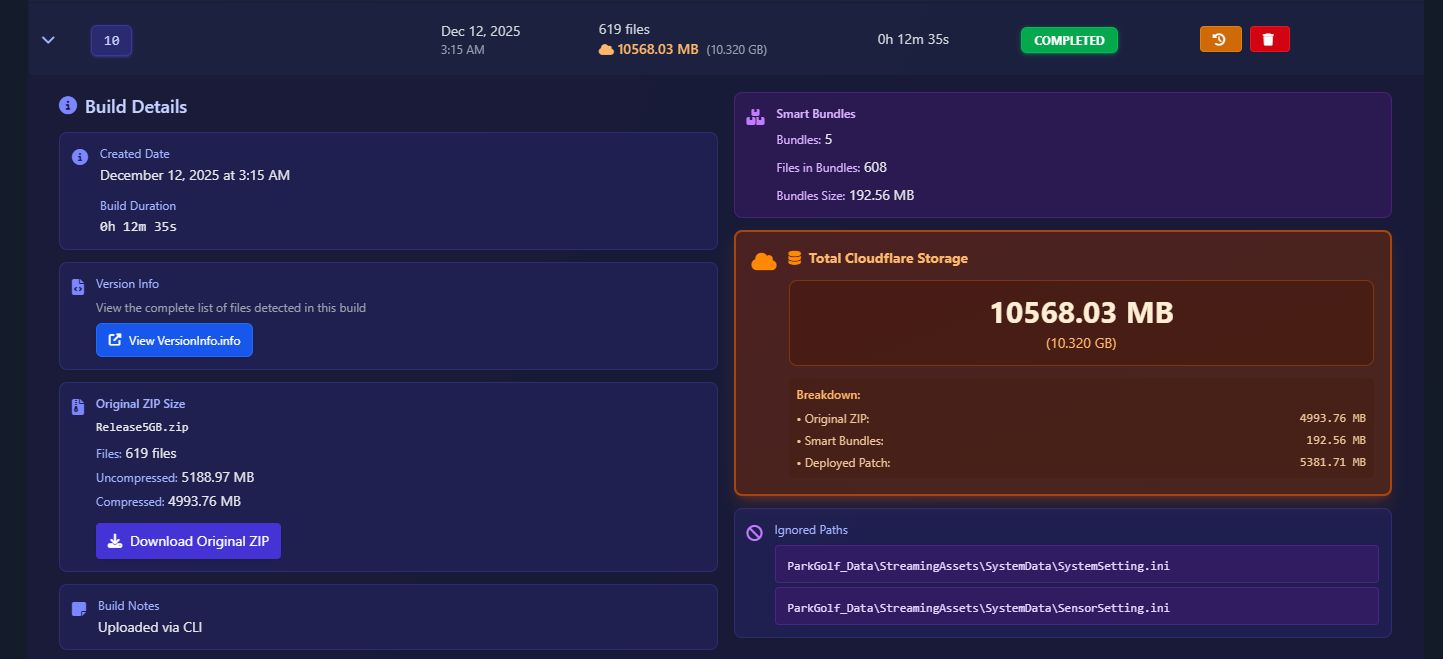
[NEW] Cloudflare Storage Calculation & Build Details

What's New:

  • Accurate Storage Calculation - App builds now display the correct Cloudflare storage consumption

  • Recalculate Storage Button - One-click recalculation for old builds with incorrect storage values

  • Storage Breakdown - Detailed breakdown showing:

    • Original ZIP size

    • Smart Bundles size

    • Deployed Patch size

    • Total Cloudflare storage

  • Reorganized Build Details Panel - Completely redesigned information layout for better readability

  • Download Original ZIP - New option to download the original build ZIP file directly from the panel

  • Smart Bundles Information - View detailed Smart Bundles metrics including:

    • Number of bundles created

    • Total bundles size

    • Files bundled count

  • Retry Build Information - See which original build was used as the source for retry builds

Where to Find:

  • Dashboard β†’ Apps β†’ Builds β†’ Expand build details to see all information

  • Recalculate Button appears for builds that need storage recalculation


[IMPROVED] Launcher & App Settings Tab Redesign

NEW - App Settings and Launcher Settings tab redesign

What's New:

  • Tab-Based Navigation - Clean, organized tabs for all settings sections

Where to Find:

  • Launchers: Settings β†’ New tab navigation at top

  • Apps: Settings β†’ New tab navigation at top


[IMPROVED] Backend & API Enhancements

What's New:

  • πŸ” Secure Build Operations - Validated path patterns for launcher build deletion

  • 🎯 Active Build Field - Database tracking for active launcher builds

  • πŸ“Š Enhanced Build DTOs - More detailed build information in responses:

    • Separate upload duration tracking (ZIP, installer, total)

    • Build configuration details

    • Obfuscation settings

    • Public-only launcher configuration

  • πŸ”„ Build Retry Logic - Metrics reset when re-enqueuing failed builds

  • 🌐 Environment Ordering - Consistent sorting (Production β†’ Staging β†’ Others alphabetically)

  • 🎨 Image URL Tracking - Previous image URLs stored for restoration feature

  • βš™οΈ Deployment Comparison - Uses previous URLs for accurate change detection

  • πŸ“Š Cloudflare Storage Tracking - Accurate storage calculation for app builds with breakdown of ZIP, bundles, and deployed patch sizes

  • πŸ”„ Storage Recalculation API - Endpoint to recalculate storage for builds with incorrect values


[IMPROVED] Performance & Stability

Improvements:

  • πŸ”„ Better Build Handling - Improved cleanup on build cancellation


Bug Fixes

Fixed:

  • βœ… Build Cancellation Cleanup - Properly deletes files when uploads are cancelled

  • βœ… Email Template Variables - Fixed missing BUILD_STATUS and FAILED_AT placeholders

  • βœ… Error Handling - Better messages for operational errors (InvalidOperationException)

  • βœ… Deployment Detection - Uses previous image URLs for accurate comparison

  • βœ… Environment Selection - Proper fallback when selected environment unavailable

  • βœ… SubNews Visibility - Unused news controls now properly hidden

  • βœ… Terms & Privacy Links - Removed unused URL assignments (cleanup)

  • βœ… File Verification Launch Timing - Game no longer launches while verification is in progress when "Verify Files at App Start" is enabled

  • βœ… Auto-Verification on Startup - "Verify Files at Launcher Start" now properly triggers automatic update checking when game is selected

  • βœ… Auto-Download Updates - Updates automatically download and install after verification when "Verify Files at Launcher Start" is enabled, eliminating manual Update button press

  • βœ… Plan Upgrade/Downgrade Detection - Subscription plan changes now properly detected and processed for billing and feature access updates

  • βœ… Custom Installation Path - Fixed game installation in custom locations with proper permission handling

  • βœ… Unnecessary Permission Elevation - Removed inappropriate administrator permission requests during game installation


πŸ› οΈ CLI

[IMPROVED] CLI Tool Updates

What's New:

  • πŸ”„ Updated Build Models - Retry properties properly synchronized with backend

  • βœ… Fixed Retry Detection - Corrected bug that was incorrectly showing builds as retryable

  • ⚑ Disabled File Hash Calculation - Removed unnecessary hash calculation during upload commands

    • Significantly faster upload times

    • Hash validation now handled server-side with xxHash64

    • Reduces client-side processing overhead

Performance Impact:

Upload operations are now faster and more efficient, especially for large build files.


✨ Summary

Feature
Status

xxHash64 Implementation

βœ… Added

Smart Bundles Technology

βœ… Added

Launcher Build Management

βœ… Added

Active Build Selection

βœ… Added

Protected Build Deletion

βœ… Added

Persistent Latest URLs

βœ… Added

Copy Download Links

βœ… Added

Image Restoration

βœ… Added

Template Section UI

βœ… Added

Settings UI Redesign

βœ… Added

Cloudflare Storage Tracking

βœ… Added

Build Cancellation Deletion

βœ… Fixed

Environment Fallbacks

βœ… Fixed

Deployment Tracking

βœ… Fixed

File Verification Timing

βœ… Fixed

Auto-Verification Startup

βœ… Fixed

Auto-Download Updates

βœ… Fixed

Plan Upgrade/Downgrade

βœ… Fixed

Custom Installation Path

βœ… Fixed

Unnecessary Permission Elevation

βœ… Fixed


Update Required: Update your desktop launcher to the latest version to access Smart Bundles, environment controls, dual executable support, and all performance improvements!

Last updated