> For the complete documentation index, see [llms.txt](https://gamelauncher.cloud/help/llms.txt). Markdown versions of documentation pages are available by appending `.md` to page URLs; this page is available as [Markdown](https://gamelauncher.cloud/help/changelog/readme.md).
# Changelog
Latest features, improvements and fixes for Game Launcher Cloud
***
*July 31, 2026*
## Cloud Saves
{% hint style="success" %}
**NEW FEATURE:** Your game's save files can now follow the player between machines. The launcher pulls their save down before the game starts and uploads it when the game exits, with no code changes in your game: you only tell us where the saves live.
{% endhint %}
A new **Cloud Saves** add-on is available on each launcher, and a matching **Cloud Saves** tab under each app's settings. The add-on starts on a **14 day free trial**, and the tier sets your launcher's total storage pool and the maximum quota you can give each player.
### Setting it up
Enable the add-on on the launcher, then open the app's **Settings, Cloud Saves** tab:
* **Per-player quota**: how much each player may store, up to your tier's cap.
* **Save versions to keep**: every upload is a new version, and the oldest are pruned past this number (default 5).
* **Save Locations**: enable each platform you ship and point it at the folder. Pick a **Base location** (AppData, Local AppData, Documents, Saved Games, User Profile or the install folder) and a **Relative path**, and the page shows the exact resulting path.
* **Include** and **Exclude patterns**: keep logs and caches out of the upload.
### What the player sees
Cloud Saves appears inside **Game Settings** for the selected game, showing the last sync, how much of their quota is used, and the **version history** with the machine each version came from. From there a player can **Sync now**, restore an older version, or turn syncing off **on that computer only**, which is what you want when one machine is a test box.
Launcher Desktop- Cloud Saves Conflict Example
If the save on the computer and the save in the cloud both changed since the last sync, the launcher stops before launching and asks. The player compares the dates and sizes and picks one, or cancels the launch. Nothing is overwritten without that choice, and the version they did not pick stays in the history.
{% hint style="info" %}
Cloud Saves needs the **Authentication System** add-on, since a save belongs to a player account. Guests never sync. Saves are stored per **app and player**, so a player's save follows them across your environments (Production, Beta and any others) rather than being kept separately per environment.
{% endhint %}
Full guide: [Cloud Saves](https://gamelauncher.cloud/help/add-ons/cloud-saves).
***
## Platform Settings Per Environment
{% hint style="success" %}
**NEW FEATURE:** Each environment can now have its own **platform settings**. Point your testing environment at a different executable, or give it its own launch arguments, without touching what your players run in Production.
{% endhint %}
Until now the executable name, the launch arguments and the rest of the Platforms tab were shared by every environment of an app. If your test build shipped a different executable, or needed extra arguments, there was no way to express that: whatever you set for Production was what every environment used.
The Platforms tab now starts with an **Environment** dropdown. Production is the base configuration, marked `default`, and editing it works exactly as before. Every other environment inherits it until you decide otherwise.
### Overriding an environment
Select any environment other than Production and you get an **Override platform settings for this environment** checkbox. While it is off, the fields below show the Production values, locked, so it is clear you are looking at inherited settings rather than editing them.
Turn it on and the form unlocks, pre-filled from Production, so an override starts as a copy instead of a set of empty fields. Everything on the tab is covered: executable name and extension, display and abbreviated names, custom launch arguments, multiple executions and their per-instance arguments, the secondary executable, and Link Only Mode.
Environments that carry an override are marked `overridden` in the dropdown, so you can see which ones have diverged without checking them one by one.
To go back, uncheck the box and save. Nothing is deleted the moment you uncheck it: the environment goes back to following Production only when you save, and the tab warns you first.
{% hint style="info" %}
An override is a **full copy**, not a list of differences. Changing Production later does not flow into an environment that already overrides, which is what you want while testing, but it does mean an override can drift from the base over time.
{% endhint %}
Full guide: [Application Settings](https://gamelauncher.cloud/help/applications/app-settings) and [Environments](https://gamelauncher.cloud/help/applications/environments).
***
## Support Chat
{% hint style="success" %}
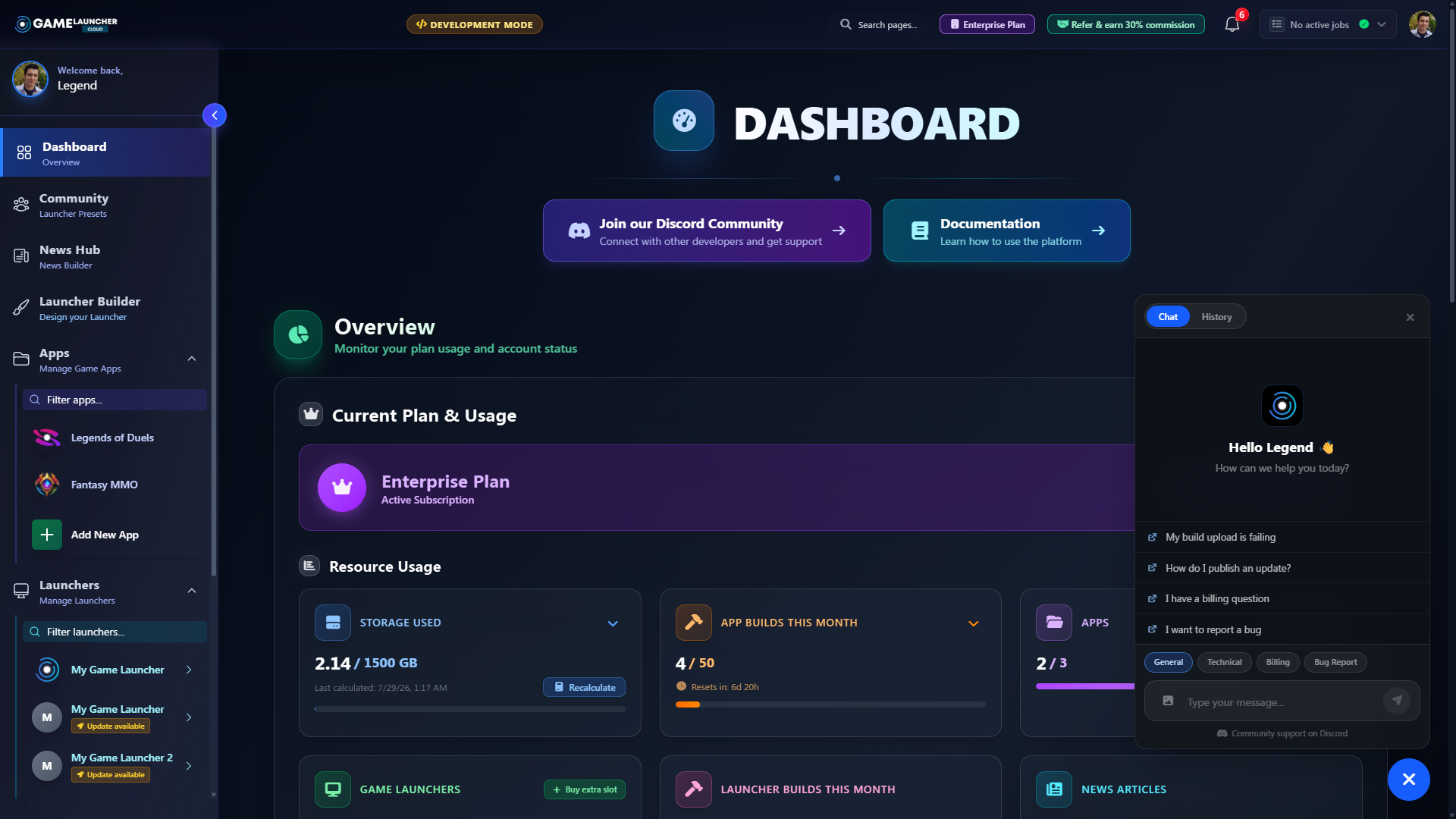
**NEW FEATURE:** Support now lives inside the dashboard. A chat bubble in the corner opens a conversation with our team: type your question and send it, and that is the whole process. No form, no subject line, no leaving the page.
{% endhint %}
Dashboard - Support Chat
The panel offers quick suggestions for the most common questions and a category picker, screenshots can be attached and are shown inline, and replies from our team arrive live, with an unread badge on the bubble when something new is waiting.
Chats and tickets are the same thing: a case. Conversations appear under **Support** next to your tickets, and any of them can be continued from the chat's **History** tab. The Discord community link now lives inside the chat panel instead of floating over every page.
***
## Build Backups
{% hint style="success" %}
**CHANGED:** Every plan now keeps your **5 newest successful builds** as backups: 5 per app, 5 per each DLC, and 5 per launcher. When a new build completes past that count, the oldest backup is removed automatically, so old builds no longer pile up against your storage.
{% endhint %}
The build that is live in an environment is always kept, even if it falls outside the newest 5, so deploying rarely can never cost you the build your players are running. Each build tab now shows a **Backups X/5** indicator, so you can see how many restore points a build has at a glance.
***
## Desktop Launcher
### Executable Selection Follows The Environment
{% hint style="success" %}
**CHANGED:** The launcher now resolves the executable, launch arguments and play button for the environment the player has selected, so an environment with its own platform settings launches its own build.
Players on an older launcher are not affected: it keeps using the Production configuration in every environment, exactly as it does today.
{% endhint %}
Switching environments now re-resolves which file gets launched, not just which folder it lives in. Update your players' launchers before you rely on a per-environment override, since a launcher released before this update will keep launching the Production executable everywhere.
### Update Check When Switching Environments
{% hint style="success" %}
**CHANGED:** Switching environments now checks the build published for that environment and starts the update if the player's copy is out of date. Before, the new build was only found after pressing **Refresh**.
{% endhint %}
Publish a build to your testing environment and testers get it on their next switch to it, with no need to tell them to press **Refresh**.
The same check now runs when a player selects an app, so it no longer depends on the **Verify files at launcher start** setting.
### One Data Folder Per Launcher
{% hint style="success" %}
**FIXED:** Launchers no longer share a folder on the player's computer. Each one now keeps its own settings, sign-in session, installed app list, cached news and logs, so a player can have several launchers installed without them interfering with each other.
{% endhint %}
Every launcher used to write to the same `%LOCALAPPDATA%\GameLauncher` folder. On a computer with two of them installed, the session saved by one was picked up by the other and both wrote to the same installed apps list. Each launcher now writes to its own folder named after its launcher id, for example `%LOCALAPPDATA%\GameLauncher\42`.
Uninstalling is clean now as well. The uninstaller removes that launcher's folder and its temporary files, and nothing else: another company's launcher on the same computer keeps working, with its data untouched.
Your existing players keep everything. On the first start after updating, the launcher moves its old data into the new folder, so nobody is signed out and nothing has to be set up again.
***
{% hint style="info" %}
**Need Help?** Check out our [Help Center](https://help.gamelauncher.cloud/) or join our [Discord Community](https://discord.gamelauncher.cloud)!
{% endhint %}

.png?alt=media&token=f747732b-dbde-4863-b126-cc1b1644cb07)